
First Steps
Getting started with Naming Toolbox is simple. You can create a free account, sign in, and begin exploring the platform immediately. There is no need to commit to a paid plan before you understand how the tools work.
After registration, you can access the dashboard and start testing the available naming tools right away. A free account gives you the opportunity to explore the platform without spending money. Most tools can be used up to 10 times for free, and checks can be used up to 2 times, so you can get a realistic impression of how the system works before making any upgrade decision.
Create an Account and Sign In
Your first step is to register for a free account and sign in to Naming Toolbox. Once you are logged in, you will be taken directly to the main dashboard, where you can access the most important areas of the platform.
This makes it easy to start experimenting immediately, even if you are still exploring which naming direction is right for your project.
Your First View: The Dashboard
After signing in, the dashboard becomes your main starting point. It gives you quick access to the core tool categories, helpful shortcuts, and your saved items.
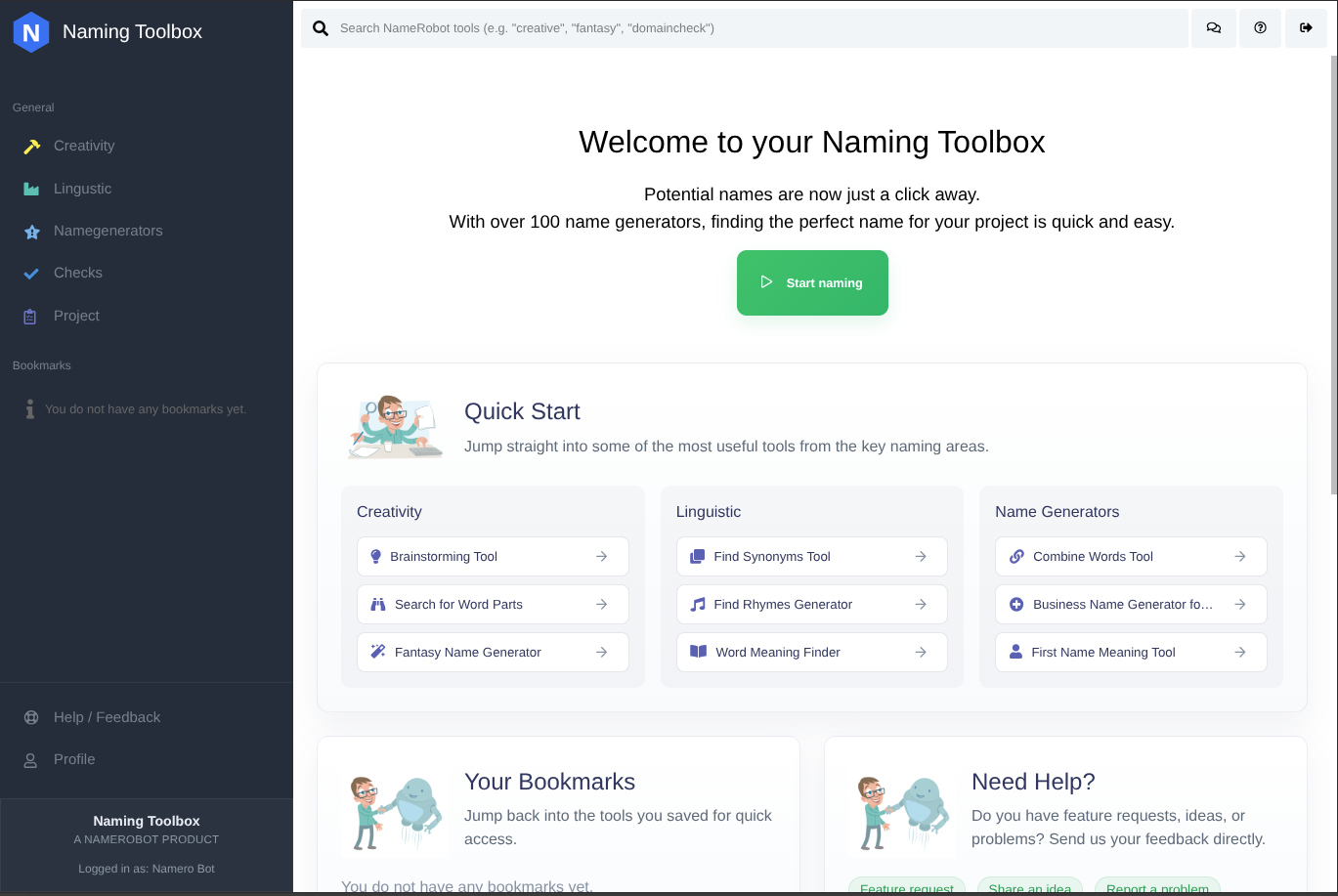
The navigation on the left side helps you move through the main product areas, such as creativity tools, linguistic tools, name generators, checks, and project-related features. At the top, you can use the search bar to find tools directly.
You do not need to understand every section at once. The dashboard is designed to help you begin quickly and explore step by step.
Start with Quick Start
One of the easiest ways to begin is the Quick Start section on the dashboard. It gives you direct access to selected tools from the most important naming areas, so you can try useful functions without having to search through the full product structure first.
This is a practical entry point if you want to generate first ideas quickly and get a feel for the platform.
Explore Without Risk
Naming Toolbox is designed so you can look around, test tools, and understand the workflow before paying anything. With the included free usage limits, you can try idea-generation tools as well as checks and see how the platform supports your naming process.
A good way to start is to open one of the suggested tools in Quick Start, enter a few keywords, review the results, and save interesting options for later comparison.
What to Do Next
Once you have signed in and explored the dashboard, the next steps are to understand how the interface works, generate your first name ideas, organize useful results, and check availability for the strongest candidates.
The following pages will guide you through these steps in more detail.